


 Updated
In CFD (contracts for difference) trading on currency pairs, a stop order or stop-loss order, helps traders manage potential losses or take advantage of market breakouts.
In other words, a stop order is one of the three main order types and is a pending instruction to buy or sell a currency pair once the price reaches a specified level, at which point it becomes a market order.
Breakouts often unfold in seconds, so entering late entries can result in worse pricing.
A buy stop order executes a market purchase when the price moves above the specified level. A sell stop order is a market order to be filled at the best available price after it falls below its entry level.
Traders often use these orders in breakout strategies and combine them with stop-loss orders and position sizing to help manage risk.
This article explains in detail what stop orders are, how buy stops differ from sell stops, and the common situations where each appears in breakout planning. The focus remains on order mechanics, basic risk rules, and common mistakes.
Disclaimer: This article is for educational purposes only and does not constitute investment advice. All examples of currency pairs, prices, and order levels are illustrative and are not recommendations to trade or invest. Stop orders do not guarantee execution at the expected price. CFDs are complex instruments that carry a high risk of losing money rapidly due to leverage. Ensure you fully understand the risks before trading.
What Is a Stop Order in Forex?
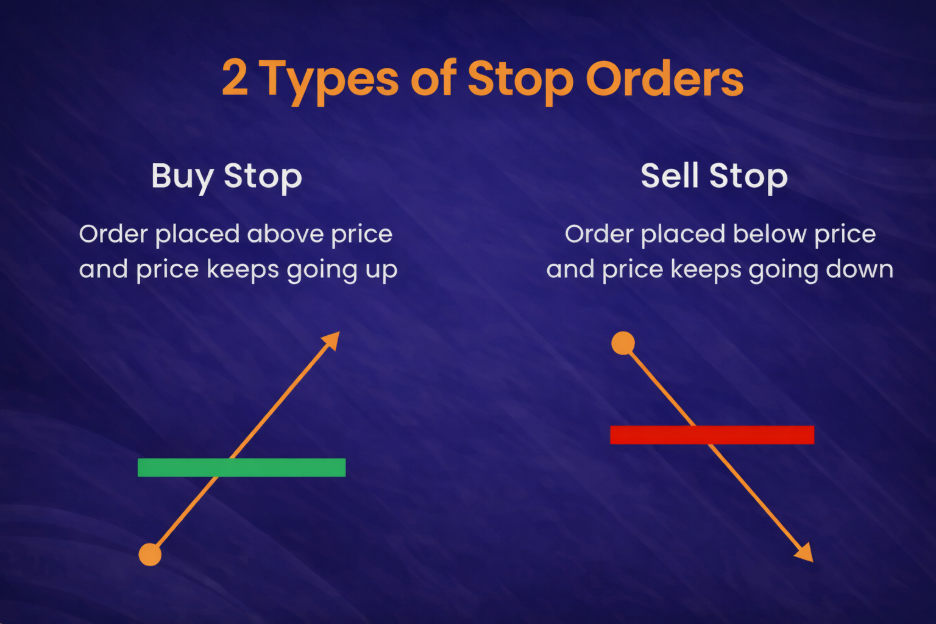
As explained above, a stop order in forex triggers a broker action once the price reaches a designated level, either limiting potential losses or allowing traders to participate in a breakout move. On the other hand, a limit order allows traders to target a specific price or better.
There are two primary actions of stop orders:
- Buy stop
- Sell stop
These orders allow traders to enter the market automatically once price reaches a predefined level, making them useful tools for breakout trading and basic risk management.
Related Article: 10 Risk Management Techniques to Use in Trading Now
Buy Stop Order: How It Works
A buy stop order is placed above the current market price. It’s triggered when the price reaches the specified level. This order type is commonly associated with upside breakouts, where the market price moves above an established resistance level.
How It Works
A buy stop has a trigger price and, after activation, a fill price.
A triggered stop order typically becomes a market order, so the fill price may differ from the trigger during fast price movements or periods of thin liquidity. This difference is widely referred to as slippage.
As a result, buy stops can be used to enter positions once the price moves above a predefined level, although the final execution price is not guaranteed.
Resistance Break Example
Assume EUR/USD trades near 1.1000. A resistance zone is identified around 1.1020, where the price has turned lower in recent sessions. A buy stop is set at 1.1030.
- If price trades up through 1.1030, the order would trigger according to platform rules, even though the actual fill price may differ depending on market conditions.
- If the price stalls below 1.1030, the order remains pending until it expires or is cancelled.
A protective stop-loss order is often discussed alongside the entry, since the idea of a breakout becomes weaker if the price falls back under the prior resistance level.
Sell Stop Order: How it Works
A sell stop order is placed below the current market price. It kicks in if the price falls to or below the trigger level. This order type is commonly associated with downside breakouts, where price moves below a previous support level.
How It Works
A sell stop also has a trigger price and a fill price.
The trigger price is the level set in advance, while the fill price is the actual market price at which the order is executed once it activates. As the order may become a market order after becoming triggered, the fill price can differ from the trigger price—this difference is commonly known as slippage.
In addition, prices can sometimes move quickly and jump over certain levels, especially during fast market conditions. This jump is often described as a gap, and when it occurs, the fill price may be significantly different from the trigger level.
Support Break Example
Assume EUR/USD trades near 1.2000. A support area is observed around 1.1980, where the price has previously bounced. A sell stop is placed at 1.1970.
- If the price falls and trades through 1.1970, the order triggers and a sell order is sent to the market.
- If the price remains above 1.1970, the order stays pending until it expires or is cancelled.
When used to protect a long position, the same type of order can serve as an exit point. It forms part of a broader risk management approach, but it does not guarantee the exact price at which the position will be closed.
Buy Stop Order vs. Sell Stop Order
| Order Type | Placement | Triggered When | Common Usage |
| Buy Stop | Above current price | Price trades at/through the trigger | Entry on upside breakout |
| Sell Stop | Below the current price | Price trades at/through the trigger | Entry on downside breakout |
4 Common Use Cases For a Buy Stop Order
Buy stop orders are commonly discussed in situations where traders want to enter the market only if the price continues moving upward. Rather than buying inside uncertain price ranges, the order activates only when the market reaches a predefined level that signals potential momentum.
1. Resistance Breakout Entry
A buy stop is often used when the price is near a resistance level, and the order should activate only if that ceiling gives way. This approach treats the breakout level as a ‘switch’, rather than buying early while the market remains inside the range.
Example:
EUR/USD trades at 1.1000. A resistance area sits near 1.1020 after multiple stalls. A buy stop at 1.1030 triggers only if the price trades through the prior ceiling and reaches the trigger.
2. Uptrend Continuation After a Pullback
In an uptrend, the price may dip before resuming higher. A buy stop can be linked to a break above a recent swing high, which some traders view as a sign that the pullback is over.
Example:
GBP/USD rises from 1.2500 to 1.2700, then pulls back to 1.2620. The pullback high is 1.2665. A buy stop at 1.2675 activates only if the price trades above that level, aligning the entry with renewed upward movement.
3. Range Resolution to the Upside
When the price compresses into a sideways band, a buy stop may be used so the trade activates only if the market exits the range to the upside. This situation is often described as a potential volatility ‘release’.
Example:
USD/JPY trades between 146.00 and 146.80 for several sessions. A buy stop at 146.90 triggers only if the price trades above the range top, which may signal an upside breakout rather than continued range trading.
4. Re-Entry After a Stop-Out or Missed Move
A buy stop can also provide a structured way to re-enter the market if the price demonstrates renewed strength after a previous exit or missed opportunity. The focus remains on price reaching a clearly defined level rather than chasing the move mid-trend.
Example:
AUD/USD rallies, then drops, and a long position is closed. Later, price forms resistance at 0.6620. A buy stop at 0.6630 triggers only if the price trades back above that level, indicating that the market has reclaimed the area that previously capped the price.
4 Common Use Cases For a Sell Stop
Sell stop orders are typically used when traders want a position to activate only if price moves lower. Instead of selling within a range, the order remains inactive until the market reaches a level that suggests downside continuation or support failure.
1. Support Breakdown Entry
A sell stop is often used when price approaches a support zone and the trader wants the sell order to activate only if support fails. The logic is simple—the order stays inactive unless the market actually trades lower.
Example:
EUR/USD trades at 1.2000. Support has formed near 1.1980 after several bounces. A sell stop is placed at 1.1970. If the price trades through 1.1970, the order activates and becomes a market sell. If price holds above support, nothing triggers.
2. Downtrend Continuation After a Pullback
In a downtrend, price may rally temporarily before rolling over again. A sell stop can be placed below a recent swing low, which some traders interpret as confirmation that the pullback ended.
Example:
GBP/USD falls from 1.2800 to 1.2600, then pulls back to 1.2680. The pullback low sits at 1.2620. A sell stop is set at 1.2610, so the trade only activates if the price trades below that level.
3. Range Resolution to the Downside
Markets can remain in sideways ranges for extended periods. A sell stop may be positioned below the lower boundary so the trade activates only if the range breaks downwards.
Example:
USD/JPY trades between 145.80 and 146.60 for several sessions. A sell stop at 145.70 triggers only if price trades below the range floor, which may indicate a downside breakout instead of continued sideways movement.
4. Protective Exit for an Existing Long Position
Sell stops are also used to define a potential exit level for a long position. In this case, the goal is not to ‘predict’ direction but to limit the impact of an adverse move if the market moves against the trade.
Example:
A long position in AUD/USD is open from 0.6600. The trader views 0.6550 as the level where the long idea no longer holds. A sell stop at 0.6545 would activate if price trades down into that area, closing the position via a market sell.
Stop Order vs. Limit Order vs. Market Order
| Order Type | What It Prioritises | When It Is Filled | Typical Drawback(s) |
| Market Order | Execution speed | Immediately | Fill price can vary |
| Limit Order | Price level | Only at the limit or better | May not fill |
| Stop Order | Activation point | After the trigger trades | Slippage or gaps |
Rule of thumb:
- Use stop orders for breakouts
- Use limit orders for pullbacks
- Use market orders when execution speed matters most
A market order executes immediately at the best available price in the order book, so execution speed matters more than the exact entry price.
A limit order sets a maximum buy price or a minimum sell price, offering price control but potentially remaining unfilled if the market never trades at that level.
A stop order stays inactive until the price reaches a trigger level, after which it typically converts into a market order. This makes it common in breakout entries and protective exits, where slippage can occur.
How to Place a Stop Order On a Trading Platform
Every broker or trading platform can look different, but the core steps are usually similar. Here’s a step-by-step guide on how to place a stop order on a trading platform:
- Select the Market: Open the forex pair you want to trade and note the live bid/ask prices shown on the platform.
- Open the Order Ticket: Use buttons such as “New Order”, “Trade”, or “Place Order” to open the order ticket.
- Choose the Order Category: Set the ticket to ‘Pending’ (or “Pending Order”), then select ‘Stop’ as the pending type, often listed as ‘Buy Stop’ or ‘Sell Stop’.
- Set the Trigger Price: Enter the price that activates the order. A buy stop is typically set above the current price, while a sell stop is usually set below it.
- Enter the Position Size: Use lots, units, or stake size, depending on the platform. Many order tickets show margin requirements and estimated costs as the position size changes.
- Add a Stop-Loss Level: Enter the price (or pip distance) where the position would close if the market moves against the trade idea.
- Add a Take-Profit Level: Enter the price (or distance) where the position would close if the market moves in your favour.
- Set an Expiry: Choose a time-in-force setting, such as GTC (good till cancelled) or a specific expiry date and time, so the pending order ends automatically if not triggered.
- Review and Submit: Confirm the direction, trigger price, position size, stop-loss, take-profit, and expiry. Then, place the order and verify that it appears in the pending orders list.
Some Safety Notes to Take Note Of
- Minimum Distance or Stop Levels: Some brokers enforce a minimum gap from the current price, so the platform may block trigger levels that are too close.
- Spread Spikes: Wider spreads can trigger stop orders earlier than expected, and fast markets may produce slippage.
- Expiry Settings: If expiry time arrives first, the order cancels automatically without triggering.
Troubleshooting
- Order Not Triggered: Price may have reached only one side of the quote (bid or ask), while the platform triggers the order based on the other side.
- Order Rejected: Common causes include stop-level rules, insufficient free margin, or an invalid price step or format.
- Wrong Order Type Selected: Stop orders activate after a trigger price is reached, while limit orders aim for a set price or better and may behave differently.
8 Common Mistakes and Practical Fixes
Education Note: This section explains common risk frameworks and mistakes for learning purposes and does not constitute personal investment advice.
1. Orders placed around major news events: Quotes can widen, and fills can slip.
Fix: Trading plans often avoid placing orders in the minutes surrounding key economic releases—read more in our article “News Trading Strategies: How To Trade The News”.
2. Stops set unrealistically close: Small price swings can close the trade too early.
Fix: Stop levels are often linked to the price point where the setup no longer makes sense.
3. Position size too large: A routine market move can create outsized losses.
Fix: Many risk frameworks begin with a fixed risk amount, then calculate the position size based on the stop distance.
4. Chasing after the move starts: Late entries often mean poorer pricing.
Fix: A predefined trigger level helps separate planned entries from reactive trades.
5. Too many pending orders at once: A sudden price spike can trigger multiple trades simultaneously.
Fix: Total exposure is often monitored across currency pairs that tend to move together.
6. Ignoring spread behaviour: Widened spreads can trigger orders earlier than expected and affect results.
Fix: Spread behaviour is usually reviewed by trading session and currency pair.
7. Pending orders left without expiry: Old trade ideas may trigger in a different market context.
Fix: An expiry time helps match the order to the setup’s valid time window.
8. Revenge trading after a loss: Decisions can become emotional and inconsistent.
Fix: Many traders pause, review trading logs, and return only when their rules are being followed.
5 Risk Notes For a Volatile Forex Market: Slippage, Gaps, and Missed Fills
Stop orders are useful, but they are not “set and forget”.
In a fast-moving forex market, prices can move faster than an order can be filled. Understanding these risks helps traders plan more carefully before placing a stop entry.
1. Slippage (Fills May Differ From the Trigger)
When the stop price is reached, a standard stop order typically executes as a market order. If liquidity is thin or price moves quickly, the fill may occur beyond the trigger level.
This situation is more common during major news releases, session openings, or sudden market spikes.
2. Price Gaps (Skipped Levels)
A gap happens when price ‘jumps’ from one level to another with little or no trading in between. This can occur after the market closes and reopens or following major news headlines.
If price jumps past a stop level, the order may trigger and fill far from the original trigger price.
Related Article: What Is News Trading? Buy the Rumour, Sell the News Explained
3. Spread Widening (Triggers May Occur Earlier)
Under certain conditions, the bid-ask spread may widen. This can happen during low liquidity periods, around daily rollovers, or during sharp market movements. Because stop orders are triggered based on the bid or ask price (depending on direction), a wider spread may activate the order earlier than expected.
4. Stop-Limit Risk (No Execution)
A stop-limit order adds a limit price after the stop price is triggered. While this may help avoid extremely unfavourable fills, it introduces another risk: the order may not execute at all. If the price moves quickly past the limit level, the order can remain unfilled.
5. Execution Rule to Remember
A stop order helps define when a trader should enter or exit the market, but it does not guarantee the exact price at which it will execute. Risk management techniques such as appropriate position sizing, sensible stop placement, and avoiding unstable market periods remain important considerations when using stop orders.
FAQs
Q: What is a stop order in forex?
A: A stop order is a preset instruction to buy or sell if the price reaches a chosen trigger level. Traders use it for planned entries or to automate exits, including stop-loss protection.
Q: How do CFD brokers typically execute stop orders?
A: Brokers typically trigger stop orders using the prices shown on their platform (bid/ask), then fill the resulting order according to their execution rules. During sharp market moves or periods of thin liquidity, the fill price may be better or worse than the trigger price due to slippage and changing spreads. However, execution rules can vary between brokers and platforms. This example reflects typical CFD platform behaviour but is provided for illustrative purposes only.
Q: Do forex trading apps support trailing stop orders?
A: Many widely used platforms offer trailing stops, although availability depends on the broker and the specific trading app. Some trailing stops only adjust while the platform is running or connected, so it’s important to check the app’s order settings.
Q: What’s the difference between stop-loss and stop-entry?
A: A stop-loss order is an exit tool that closes an open position if the price moves against it. A stop-entry order opens a new position only after the price breaks through a predefined trigger level.
Q: How do stop orders support risk management in forex trading?
A: Stop orders help forex traders define risk before entering a trade by setting clear entry or exit rules. As stop orders may experience slippage during fast market conditions, appropriate position sizing and realistic stop placement are key considerations.